Have Any Question?
 +44 7452 122728




 Back
Back




What is Pay As You Earn (PAYE) and How Does It Work?
Pay As You Earn (PAYE) is a tax collection system where Income Tax and National Insurance contributions are deducted automatically from an employee’s salary. Employers calculate and deduct the required amounts before paying employees. The tax is calculated based on an employee’s earnings, including salaries, bonuses and allowances.Table Of Contents


 44 7452 122728
 03-Aug-2026
Author-Veronica Davis
What if paying your taxes did not require filling out forms or making manual payments every month? For millions of employees in the UK, this is already possible through the Pay As You Earn (PAYE) system. It allows employers to calculate and deduct Income Tax and National Insurance contributions directly from an employee’s salary before payment.
Understanding how PAYE works can help you read your payslip confidently, recognise whether the correct deductions have been made and avoid unexpected tax issues. In this blog, you will learn What is PAYE, how it works, who needs to use it, how tax is calculated and why it is important for both employees and employers. Read on!
What is PAYE?
Pay As You Earn (PAYE) is His Majesty's Revenue and Customs’ (HMRC) system for collecting Income Tax and National Insurance contributions directly from an employee’s earnings. Under this system, employers calculate the amounts due through payroll each payday and deduct them before the employee receives their pay.
The deducted amounts are then reported and paid to HMRC. This helps employees pay the required tax and National Insurance throughout the tax year rather than making separate manual payments. By collecting these amounts automatically through payroll, PAYE simplifies tax administration, reduces the likelihood of unpaid tax, and helps employers and employees comply with UK tax requirements.
How Does PAYE Work?
PAYE follows a straightforward payroll process to ensure employees pay the right amount of Income Tax and National Insurance throughout the tax year. Here's how it works:
1) Employee Information is Collected: When an employee starts a job, they provide their tax details, such as a previous employment tax form or Starter Checklist. This information helps the employer determine the correct tax code and payroll setup.
2) Gross Pay is Calculated: The employer calculates the employee's gross pay for the pay period. This includes basic salary, overtime, bonuses, commissions and any other taxable earnings.
3) Tax and National Insurance are Calculated: Using the employee's tax code, earnings and National Insurance category, the payroll system calculates how much Income Tax and National Insurance should be deducted.
4) Deductions are Made Before Payment: The calculated Income Tax, National Insurance contributions and any other authorised payroll deductions are taken from the employee's gross pay before their salary is paid.
5) Net Salary is Paid: After all deductions have been made, the remaining amount, known as net pay or take-home pay, is paid to the employee.
6) Payroll Information is Reported to HMRC: The employer submits payroll details to HMRC through the Real Time Information (RTI) system each time employees are paid.
7) Tax Payments are Sent to HMRC: The employer pays the deducted Income Tax and National Insurance contributions to HMRC within the required deadlines, ensuring compliance with UK tax regulations.
What PAYE Deducts from Your Pay?
PAYE is designed to collect a range of payments directly from your wages or pension. These amounts are calculated automatically based on the information held by HMRC and your employer. By deducting them at source, PAYE helps ensure the correct payments are made throughout the year.
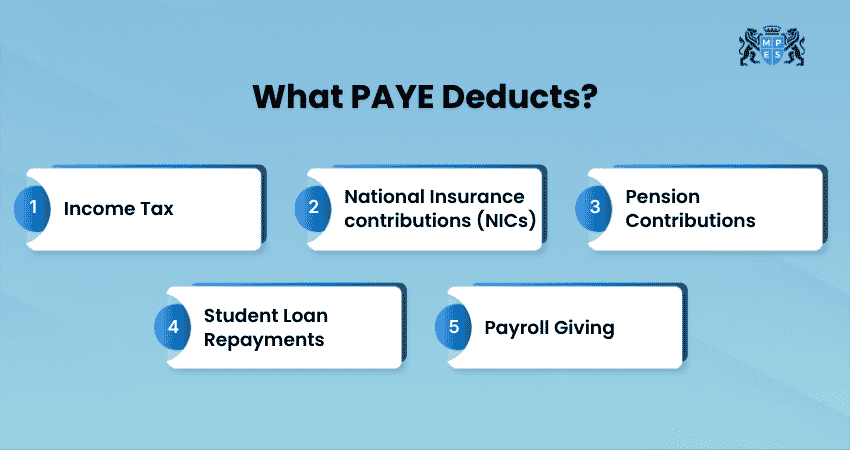
Depending on individual circumstances, PAYE can automatically deduct:
1) Income Tax
2) Taxable company benefits and other payroll-related deductions
3) National Insurance contributions
4) Student loan repayment
How is PAYE Calculated?
Several factors determine how much PAYE is deducted from an employee's pay. Here is how it is calculated:
1) Tax Code
HMRC assigns every employee a tax code that tells employers how much tax-free income they are entitled to receive during the tax year. Using the correct tax code helps ensure the right amount of Income Tax is deducted from each payment.
2) Gross Earnings
PAYE is calculated using an employee's gross earnings before any deductions are made. Gross earnings may include salary, wages, overtime, bonuses, commissions and other taxable payments.
3) Personal Allowance
Most people can earn a certain amount during each tax year before paying Income Tax. This tax-free amount is known as the Personal Allowance. For the 2026/27 tax year, the standard Personal Allowance is £12,570.
4) Taxable Income
Once an employee’s income exceeds their available Personal Allowance, Income Tax is generally charged on the amount above it. The employer applies the relevant tax bands and rates to the employee’s taxable pay during each payroll period.
5) Income Tax Bands
Income Tax is progressive, meaning that different portions of taxable income may be charged at different rates as earnings increase. The main rates and bands used for employment income in England, Wales and Northern Ireland may differ from those applied in Scotland.
6) Reduction of the Personal Allowance
The Personal Allowance begins to reduce when an individual’s adjusted net income exceeds £100,000. It is reduced by £1 for every £2 earned above this threshold and is normally completely withdrawn when income reaches £125,140.
7) National Insurance Contributions
Alongside Income Tax, employers calculate National Insurance contributions based on the employee's earnings and National Insurance category. Although National Insurance is calculated separately from Income Tax, it is usually deducted through the PAYE payroll process.
8) Other Allowances and Reliefs
Other allowances and tax reliefs may affect an individual’s overall tax position or tax code, depending on their circumstances. These may include:
1) Marriage Allowance
2) Personal Savings Allowance
3) Dividend Allowance
Example of How PAYE is Calculated
Suppose an employee earns £36,000 per year (£3,000 per month) and has the standard Personal Allowance of £12,570.
1) Annual Salary: £36,000
2) Personal Allowance: £12,570
3) Income Above the Personal Allowance: £23,430 (£36,000 − £12,570)
4) Income Tax is calculated on this taxable amount using the applicable tax bands.
5) National Insurance and any other applicable deductions are then calculated.
6) The remaining amount is paid to the employee as their net salary.
Understand the laws that shape great businesses with Corporate and Business Law (LW) Training - Sign up now!
When Do You Need to Register for PAYE?
If you're employing staff, you'll need to register for PAYE with HMRC before your first payday. You must register if any employee:
1) Earns £96 or more per week (2026/27 threshold)
2) Receives expenses or company benefits
3) Receives a pension
4) Has had another job during the tax year
5) Has received Jobseeker’s Allowance, Employment and Support Allowance (ESA), or Incapacity Benefit
It is recommended to register in advance, but not more than two months before your first payday. Once your registration is finished, HMRC will send you an employer reference number. You'll need this number to submit payroll information and communicate with HMRC about your PAYE responsibilities. The reference number can take up to 30 days to arrive.
Employer PAYE Responsibilities
If you employ staff, you have several important PAYE responsibilities as an employer. Failure to meet PAYE obligations can result in penalties, interest charges and additional administrative work.
To stay compliant with HMRC requirements, employers must:
1) Register for PAYE with HMRC before paying employees.
2) Calculate and deduct the right amount of Income Tax and National Insurance from employees’ wages.
3) Submit payroll information through Real Time Information (RTI) on or before each payday.
4) Pay all PAYE deductions to HMRC on time, including employer National Insurance contributions.
How to Set up a PAYE Payroll?
Setting up a PAYE payroll involves several key steps. Once your payroll is set up, you can calculate employee pay, report payroll information and meet your PAYE obligations. Let's check the steps involved:
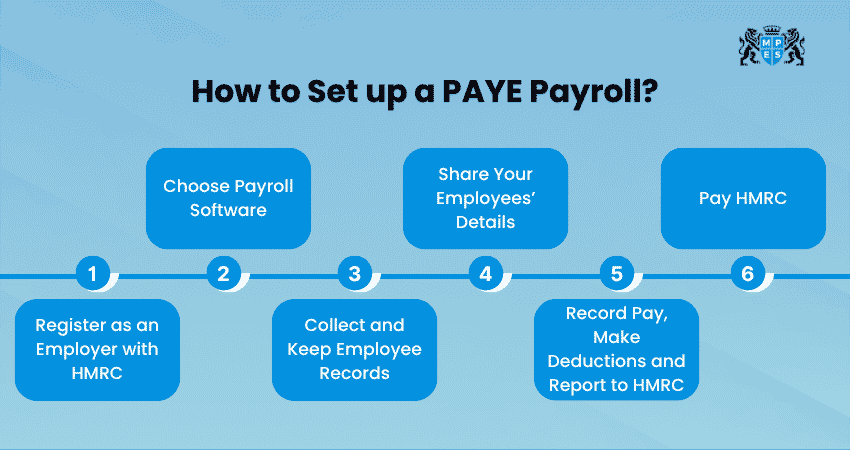
1) Register as an Employer with HMRC
Register as an employer with HMRC before your first payday. Once registered, you'll receive the details needed to operate PAYE.
2) Choose Payroll Software
The next step is selecting payroll software that suits your business. Consider these steps:
a) HMRC-recognised payroll software can automatically calculate Income Tax and National Insurance deductions. You can go to GOV.UK for the basic PAYE tools.
b) It can also submit Real Time Information (RTI) reports to HMRC and generate payslips for your employees.
c) Many payroll systems also support additional payroll tasks, such as workplace pension auto-enrolment.
d) They also support student loan repayments and statutory payments like Sick Pay and Maternity Pay.
e) This helps you manage payroll efficiently and stay compliant with regulations.
3) Collect and Keep Employee Records
Gather and maintain accurate employee records, including personal details, tax codes, National Insurance numbers and payroll information.
4) Share Your Employees’ Details
Provide HMRC with the required information about your employees before processing payroll.
5) Record Pay, Make Deductions and Report to HMRC
Calculate employees' pay, deduct Income Tax and National Insurance contributions and submit payroll information to HMRC on or before each payday.
6) Pay HMRC
Pay the Income Tax, National Insurance contributions and any other PAYE deductions you owe to HMRC by the relevant payment deadline. If you pay online, payment is usually due by the 22nd of the following month. If you pay by cheque, HMRC must receive your payment by the 19th of the following month.
Learn the essential taxation skills that help you navigate financial and compliance responsibilities. Register for Foundations in Taxation (FTX) Course today!
Why PAYE Software is Essential?
Managing PAYE manually can be time-consuming and increase the risk of mistakes. This is where Payroll software comes in. Now that you know What is PAYE, the key benefits of PAYE software include:
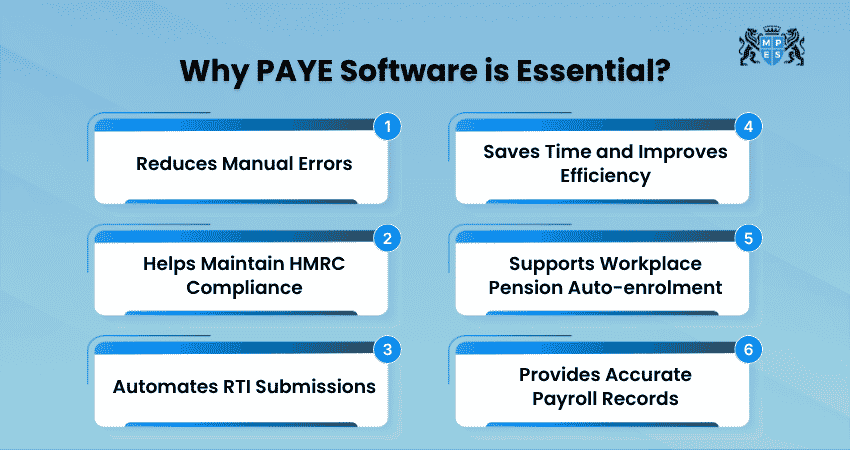
1) Reduces Manual Errors: PAYE software automatically calculates tax, National Insurance and other deductions.
2) Helps Maintain HMRC Compliance: PAYE software keeps payroll processes aligned with current regulations.
3) Automates RTI Submissions: Most payroll software allows employers to submit Real Time Information (RTI) reports directly to HMRC.
4) Saves Time and Improves Efficiency: PAYE software streamlines payroll tasks and reporting.
5) Supports Workplace Pension Auto-enrolment: PAYE software makes it easier to manage pension contributions and related deductions.
6) Provides Accurate Payroll Records: Maintains accurate payroll records, making employee information easier to access, update and manage.
PAYE Deadlines
The frequency of PAYE payments depends on your average monthly PAYE and National Insurance liability. Paying on time is important, as late payments can lead to penalties and interest charges.
1) Monthly Payments (Most Businesses): Most employers make PAYE payments on a monthly basis. Payments are due:
a) By the 22nd of the following month if you pay electronically.
b) By the 19th of the following month if you pay by post.
2) Quarterly Payments (Smaller Businesses): You may be able to pay quarterly if your average monthly PAYE and National Insurance liability is less than £1,500. For businesses that qualify:
a) Payments are due by the 22nd of a month following the end of each quarter.
b) You must contact HMRC's PAYE helpline to arrange quarterly payments.
Common PAYE Mistakes to Avoid
Even small PAYE mistakes can cause problems, from incorrect tax deductions and employee concerns to HMRC penalties and extra administrative work. Here are some of the most common errors employers should watch out for.
1) Missing RTI Submission Deadlines: Full Payment Submissions (FPS) must be sent to HMRC on or before employees are paid. Late submissions can result in automatic penalties.
2) Using the Wrong Tax Code: Always use the latest tax code provided by HMRC. Applying an outdated code can result in an employee paying too much or too little tax. This may need to be corrected later.
3) Paying HMRC After the Deadline: Even a short delay can be treated as a late payment. HMRC may charge penalties and interest, with penalties increasing for repeated late payments.
4) Not Reporting Starters and Leavers Correctly: New employees should be included in your next FPS submission. When an employee leaves, make sure their leaving date is recorded and a P45 is issued.
Common PAYE Issues
PAYE issues can sometimes result in employees paying more or less Income Tax than they should. In many cases, HMRC identifies and corrects these issues automatically. However, if you believe your PAYE deductions are incorrect, you should contact HMRC to review your tax position. Below are some of the most common PAYE issues:
1) Paying Too Much or Too Little Tax
If HMRC finds that you've paid the wrong amount of tax through PAYE, they will usually contact you directly. This can happen for several reasons, such as being assigned the wrong tax code. HMRC will share a tax calculation letter with you, known as a P800, explaining whether you're due a refund or need to pay additional tax.
The letter will also provide instructions on what to do next. If you have underpaid tax, HMRC may recover the amount by adjusting your tax code. This allows the outstanding tax to be collected gradually through your wages or pension during the following tax year.
2) Possibility of PAYE Tax Being Written off
If you believe an underpayment happened because of a mistake or delay by HMRC, you may be able to ask for the tax to be written off. To request this, contact HMRC by phone or in writing and explain your situation.
It is generally best to do this before you begin making payments towards the outstanding tax. This is because HMRC will review the circumstances and decide whether the debt can be cancelled.
3) Changes in Personal Allowance
HMRC can adjust your Personal Allowance, which may affect how much Income Tax you pay through PAYE. For example, if you receive taxable benefits from your employer, HMRC may reduce your Personal Allowance by changing your tax code. This helps ensure that the correct amount of tax is collected throughout the year.
HMRC may also reduce your Personal Allowance if you have underpaid tax and the amount owed is being collected through PAYE instead of being paid directly. In some cases, where the tax owed exceeds your Personal Allowance, your tax code may include the letter 'K', indicating that additional tax needs to be collected through payroll.
Conclusion
PAYE simplifies the tax journey by automatically deducting taxes from earnings. This makes compliance easier for both employees and employers. It creates a seamless connection between income and tax obligations. By understanding What is PAYE and how it works, individuals can better manage their finances, avoid unexpected tax liabilities and gain greater confidence in their financial planning.
Build practical accounting and finance expertise with ACCA Applied Skills Training - Sign up now!
Frequently Asked Questions
Q. Do You Get Your PAYE Tax Back?
Yes, you can get a PAYE tax refund if you have paid more Income Tax than you owe. This may happen if:
a) You were on the wrong tax code
b) You stopped working during the tax year
c) You had changes to your income
HMRC will usually notify you if you are due a refund, or you can check through your Personal Tax Account.
Q. What Happens if You Pay PAYE Late?
HMRC may charge late payment interest and penalties. For monthly and quarterly PAYE, the first late payment in a tax year does not count as a default and usually does not incur a default penalty. After that, default penalties range from 1% to 4% of the unpaid amount, depending on the number of defaults during the tax year.
Q. What is the Difference Between PAYE and Self-assessment?
PAYE is a system where Income Tax and National Insurance are deducted from your wages before you are paid. Self-assessment is a system where individuals pay any tax they owe themselves. PAYE is mainly for employees and pensioners, while Self-assessment is used by self-employed individuals and people with other untaxed income.